Search
Online Courses

Pocket Guides



Last Update: 28.11.2009. By azarai in pyglet | python
Some time after i wrote (Rendering particles in realtime with py-lepton)[http://codeboje.de/Rendering-particles-in-realtime-with-py-lepton/ “Rendering particles in realtime with py-lepton”], i got the idea of creating an animated scene with “flowers falling from a tree and get blown away by wind”. Today i got the time to actually code a first simple version.
Update 30.Nov: Added download incl. images at the bottom.
Screenshot:
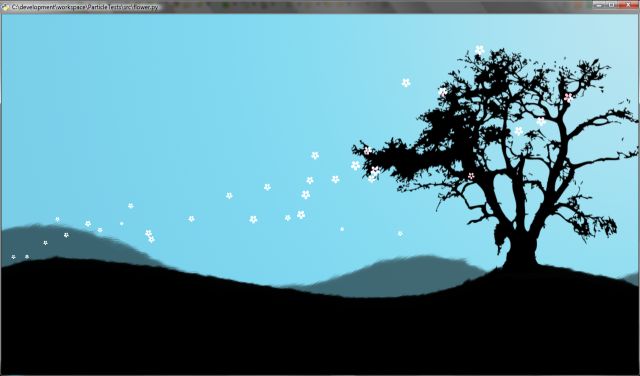
Here is the code of the animated scene. I made comments in the code that should explain everything. I use py-lepton for the wind effect and 4 lepton domains of controlling the flow of the flowers. But its not looking natural yet. I’d appreciate any critique & comments.
from lepton import Particle, ParticleGroup, default_system
from lepton.renderer import BillboardRenderer
from lepton.texturizer import SpriteTexturizer
from lepton.emitter import StaticEmitter
from lepton.controller import Gravity, Lifetime, Movement, Growth, Magnet
from lepton.domain import Disc

import pyglet
from pyglet.gl import *
from pyglet import image

#create pyglet window
window = pyglet.window.Window(width=1280, height=720, visible=False)
window.clear()

#enable alpha blending
glEnable(GL_BLEND)
glShadeModel(GL_SMOOTH)
glBlendFunc(GL_SRC_ALPHA,GL_ONE)
glDisable(GL_DEPTH_TEST)


def get_color(r,g,b,a):
    """ converts rgba values of 0 - 255 to the equivalent in 0 - 1"""
    return (r/255.0,g/255.0,b/255.0, a/255.0)

flower_tex = image.load('textures/flower.png').get_texture()

background = image.load('textures/bg.png').get_texture()

## create domain for wind effect
wind_domain = Disc((782, 230, 0),(0,1,0), 300, 10) #in the hollow, pushes flowers away
wind_domain2 = Disc((350, 180, 0),(0.5,0.5,0), 100, 10) #at the left hill, right side before top
wind_domain3 = Disc((480, 400, 0),(1,0,0),100, 10) # above between first to domains
wind_domain4 = Disc((1044, 420, 0),(1,0,0), 200, 50) # in the tree, pulling flowers


# create 3 flower emitters at different positions
flower_emitter = StaticEmitter(
    rate = 1,
    template=Particle(
        position=(786,439),
        size=(20,20,0),
        velocity=(-20,0,0),
        color= get_color(255, 192, 213,255),
        ),
    deviation=Particle(
        position=(20,20,0.10),
        velocity=(20,50,0),
        ),

     )
flower_emitter2 = StaticEmitter(
    rate = 1,
    template=Particle(
        position=(1126,579),
        size=(20,20,0),
        velocity=(-20,0,0),
        color= get_color(255, 192, 213,255),
        ),
    deviation=Particle(
        position=(20,20,0),
        velocity=(20,50,0),
        ),

     )

flower_emitter3 = StaticEmitter(
    rate = 1,
    template=Particle(
        position=(961,582),
        size=(20,20,0),
        velocity=(-20,0,0),
        color= get_color(255, 192, 213,255),
        ),
    deviation=Particle(
        position=(20,20,0),
        velocity=(20,50,0),
        ),

     )

# use default_system and set global controllers, so that flowers are emitted at a constant rates
default_system.add_global_controller(
        Lifetime(20),
        Movement(damping=0.93),
        Growth(-1),
        Gravity((-120, -60, 0)),
        Magnet(wind_domain, charge=-150000.0),
        Magnet(wind_domain2, charge=-150000.0),
        Magnet(wind_domain3, charge=10000.0),
        Magnet(wind_domain4, charge=2000.0),

)

flowers = ParticleGroup(
    controllers=[
        flower_emitter, flower_emitter2, flower_emitter3
    ],
    renderer=BillboardRenderer(SpriteTexturizer(flower_tex.id)))


# clear screen and draw particles
@window.event
def on_draw():
    window.clear()
    background.blit(0,0)
    glLoadIdentity()
    default_system.draw()

# setup scheduler for particle updates and start pyglet
if __name__ == '__main__':
    window.set_visible(True)
    pyglet.clock.schedule_interval(default_system.update, (1.0/30.0))
    pyglet.clock.set_fps_limit(None)
    pyglet.app.run()