Search
Online Courses

Pocket Guides



Last Update: 20.09.2009. By azarai in game development | pyglet | python
While browsing through deviantart i run across some nice prerendered particle effects. The effects are made for RPG Maker VX and cover mostly some kind of magic spells. Game use is allowed. So we got effect animations, pyglet and some spare time. Let the fun begin.
The effects do have a black background instead of transparency, so one has to do some post proccessing before further use. I did this with Gimp and used a grayscale version of an effect image as its alpha mask.
Now lets start the fun part and use some of these effects in pyglet. The most important task is reading and processing the effects animation from the image. Its done in the create_effect_animation function. Basically i use an ImageGrid and bring the AnimationFrames in the correct order and give back an pyglet Animation object. The rest of the demo is just control stuff…
Controls:
w : switch background to white
b : switch background to black
1 - 5 : change particle effect
Left Mouse click : spawn new effect at mouse location
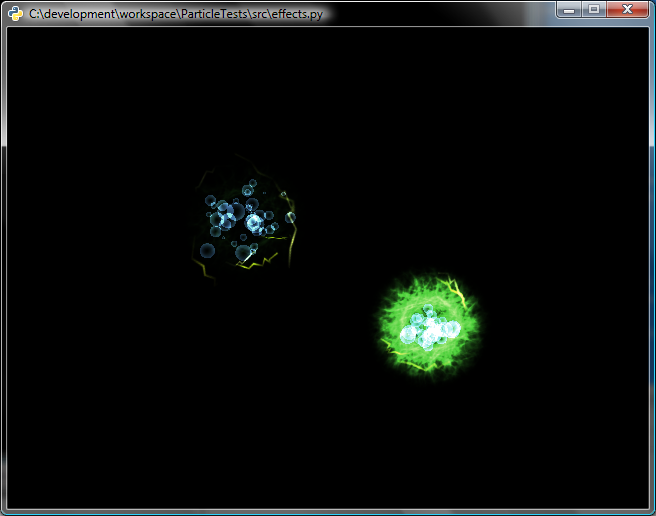
Screenshot:
import pyglet
from pyglet.image import Animation, AnimationFrame
window = pyglet.window.Window()

white = (1,1,1,1)
black = (0,0,0,1)
pyglet.gl.glClearColor(*white)

effects = []
use_effect = 1

def create_effect_animation(image_name, columns, rows):
    effect_seq = pyglet.image.ImageGrid(pyglet.image.load(image_name), rows, columns)
    effect_frames = []
    for row in range(rows, 0, -1):
        end = row * columns
        start = end - (columns -1) -1
        for effect_frame in effect_seq[start:end:1]:
            effect_frames.append(AnimationFrame(effect_frame, 0.1))

    effect_frames[(rows * columns) -1].duration = None
    return Animation(effect_frames)

effect_anims = [create_effect_animation('c:\\temp\\_LPE__Elemental_Burst_by_LexusX2.png', 5, 6),
                create_effect_animation('c:\\temp\\_LPE__Fire_Arrow_by_LexusX2.png', 5, 9),
                create_effect_animation('c:\\temp\\_LPE__Healing_Circle_by_LexusX2.png', 5, 10),
                create_effect_animation('c:\\temp\\_LPE__Flaming_Time_by_LexusX2.png', 5, 5),
                create_effect_animation('c:\\temp\\_LPE__Gale_by_LexusX3.png', 5, 8) ]


class EffectSprite(pyglet.sprite.Sprite):
    def on_animation_end(self):
        self.delete()
        effects.remove(self)

@window.event
def on_mouse_press(x, y, button, modifiers):
    if(pyglet.window.mouse.LEFT == button):
        effect = EffectSprite(effect_anims[use_effect - 1])
        effect.position = (x-effect.width/2, y - effect.height/2)
        effects.append(effect)

@window.event
def on_key_press(symbol, modifiers):
    global use_effect
    if symbol == pyglet.window.key.B:
        pyglet.gl.glClearColor(*black)
    if symbol == pyglet.window.key.W:
        pyglet.gl.glClearColor(*white)
    if symbol == pyglet.window.key._1:
        use_effect = 1
    if symbol == pyglet.window.key._2:
        use_effect = 2
    if symbol == pyglet.window.key._3:
        use_effect = 3
    if symbol == pyglet.window.key._4:
        use_effect = 4
    if symbol == pyglet.window.key._5:
        use_effect = 5


@window.event
def on_draw():
    window.clear()
    for effect in effects:
        effect.draw()

pyglet.app.run()
I am not sure if i can put the processed image son my site, so you need to get the particle effects by yourself for now. Download effect with pngs
Happy hacking :-)